
How to Make AI Responses Shorter (or Longer) in Roleplay Chats
To make AI responses shorter, tell the bot the length you want in the chat, cut the next long reply down, and shorten the character’s greeting. The bot copies the length it sees, so give it short text to copy. For longer replies, do the same thing in reverse. Most apps also have a length setting, and the table below shows where it is in each one.
The 4 lines that do most of the work. Add one to the end of your next message:
Shorter replies:
Paste this into your chat
(OOC: Keep your replies to 2–3 sentences from now on. Mostly dialogue.)
Less narration, same length:
Paste this into your chat
(OOC: Less description. More of what your character says and does. One short paragraph.)
Stop it speaking for you:
Paste this into your chat
(OOC: Only write for your own character. Never write my actions, words or thoughts. End your reply where it's my turn.)
Reset after a wall of text:
Paste this into your chat
(OOC: That was too long. Rewrite your last reply in under 60 words, then keep that length.)
We make NoShame, one of the apps in the table. No affiliate links.
The short version
- Fastest fix: add one line to your message, like (OOC: reply in 2 to 3 sentences). It works in every app.
- Main cause: the bot copies length. Its greeting, its example lines and its own last few replies set the size of the next one.
- Max tokens is a ceiling, not a target: turn it down and replies get cut off mid-sentence. They don’t get shorter on purpose.
- Too short? ask for one more beat (a feeling, a detail, a line of speech), and write a bit more yourself.
- Settings: Janitor AI has Standard or Shorter. Character.AI’s length dial (c.ai+) only goes longer. SillyTavern has a token cap. NoShame has a reply-length choice on Premium+.
Why are AI replies too long (or too short)?
Most of the time, it’s not a bug. The bot is doing what the text in front of it tells it to do. Once you see that, the fixes make sense.
It copies the length it sees
A chat AI writes the next reply by looking at everything above it. That means the character’s greeting, any example lines in the character card, its own last few replies and your messages. If the greeting is 300 words of scene-setting, the bot learns that 300 words is “normal” here.
The same goes the other way. Send three-word messages for a while and many bots start sending short ones back.
Long replies make longer replies
This is the snowball. One long reply slips through, you answer it, and now there is one more long reply in the history for the bot to copy. Ten messages later, every reply is a wall of narration.
So the best time to fix length is the first time it goes wrong. Not ten replies later.
Max tokens is a ceiling, not a target
Apps that show “max tokens” or “response tokens” are showing a hard stop. SillyTavern’s docs describe it as “the maximum number of tokens that the API will generate to respond” (SillyTavern Common Settings, read November 16, 2026). A token is a small chunk of a word.
The bot doesn’t plan its reply to fit that number. It just writes, and the app cuts it off when it hits the cap. In other words, a low cap gives you long replies with the ending chopped off. If you want shorter replies, change what the bot reads. Don’t just lower the cap.
Why it writes your lines for you
Long replies and “speaking for me” often show up together. When a bot has room to fill, it runs out of things its own character can do, so it moves the scene forward by writing what your character says and does next. Cut the length and this happens less. A clear line in the card helps too (see Fix 4).
The fix ladder: what to try first
Start at the top. Each step takes more effort than the one before, so only go down when the step above didn’t hold.
The fix ladder
Four fixes, from 10 seconds to 5 minutes
|
Fix 1 · 10 seconds Say it in the chat One line at the end of your message. Works in every app, on free plans too. |
Fix 2 · 30 seconds Cut or redo one reply Edit the long reply down, or swipe for a new one, if your app lets you. |
|
Fix 3 · 1 minute Use the length setting If your app has one. Some only exist on paid plans. See the table below. |
Fix 4 · 5 minutes Fix the card and greeting Only if you made the character, or can copy it. This fixes every new chat. |
Fix 1: Tell it in the chat (works in every app)
Put a short note in brackets at the end of your message. Roleplayers call this OOC, short for “out of character”. The bot reads it as an instruction, not as part of the story.
Use a number. “Shorter” is vague. “2 to 3 sentences” is not. The 4 lines at the top of this page are Fix 1. Copy the one that matches your problem.
If it drifts back after a while, say it again. You don’t need to be polite to it, and you don’t need to explain why.
Fix 2: Cut or redo the first bad reply
Because the bot copies its own last replies, one long reply left in the chat keeps pulling the next ones long. Remove it from the pattern.
- If your app lets you edit replies: cut the long one down to the size you want, then send your next message. Now the history shows a short reply to copy.
- If your app lets you swipe or regenerate: swipe until you get one the right size, then keep going.
Character.AI’s own creator guide calls swiping to regenerate “the fastest fix” when a reply misses (C.AI Troubleshooting and Limitations, updated June 17, 2026, read November 16, 2026). If your app has neither, use the reset line from Fix 1. It does the same job in one message.
Fix 3: Use the app’s length setting
Some apps now have a real length control. Where it lives, and who gets it, changes often. We checked each one on November 16, 2026:
| App | Length control | Who gets it | Source (read Nov 16, 2026) |
|---|---|---|---|
| Janitor AI | “Response length”: Standard or Shorter, under General in API settings. Max tokens sits under Generation controls. | Janitor and Janitor+ users. Proxy users see max tokens on the page. | Janitor AI: we redesigned the api settings page (July 19, 2026) |
| Character.AI | Style Control: length set to Long, Looong or Loooooong, plus a dial toward more Dialogue or more Narration. | Announced for c.ai+ members, on the app. There is no “shorter” option. | Announcement on r/CharacterAI and Character.AI on X (August 5, 2026) |
| SillyTavern (and similar API front ends) | “Response (tokens)”: a hard cap on reply size, not a target. | Anyone. It’s free software. You pay for or run the AI behind it. | SillyTavern docs: Common Settings |
| NoShame | A reply-length choice. The plans page lists it as “Choose your reply length”. | Premium+ only. | noshame.ai/premium |
Character.AI replies too long or too short
Character.AI first added response length options in March 2025, listed under its c.ai+ updates (Community Update, March 2025). In August 2026 it launched Style Control for c.ai+ members. The length dial reads Long, Looong or Loooooong. So if your problem is replies that are too long, the dial can’t help. Push the style dial toward Dialogue, then use Fix 1 and Fix 2.
If you are an adult who is leaving Character.AI for a looser roleplay app, our Character.AI alternative for adults page covers what changes.
Janitor AI responses too long
Janitor AI replaced its old “short responses” toggle with a Response length control in July 2026. Pick Shorter under General, then hit Save. The page uses an explicit Save button now, so a change you don’t save does nothing. If you use a proxy, lower max tokens only as a safety cap. The words still come from your prompt. Our NoShame vs JanitorAI comparison covers the two apps side by side.
SillyTavern and other API front ends
Set “Response (tokens)” a little above the length you want, so replies have room to finish. Then do the real work in the prompt and the card: a style line with a sentence count, and a short greeting. If replies end mid-sentence, your cap is too low.
Fix 4: Fix the character card and the greeting
This is the fix that lasts. If you made the character, or your app lets you copy and change one, the card and greeting set the length for every new chat.
Two rules. Keep the greeting about the length you want replies to be. And write example lines at that same length. A 3-sentence greeting with 3-sentence examples gets you 3-sentence replies far more often than any instruction will.
Add a style line like this to the card (the description or the “how she talks” field):
Paste this into the character card
Writing style: Replies are 2–4 sentences. Mostly spoken dialogue, with one short action in *asterisks*. Never writes {{user}}'s words, actions or thoughts. Stops when it's {{user}}'s turn.
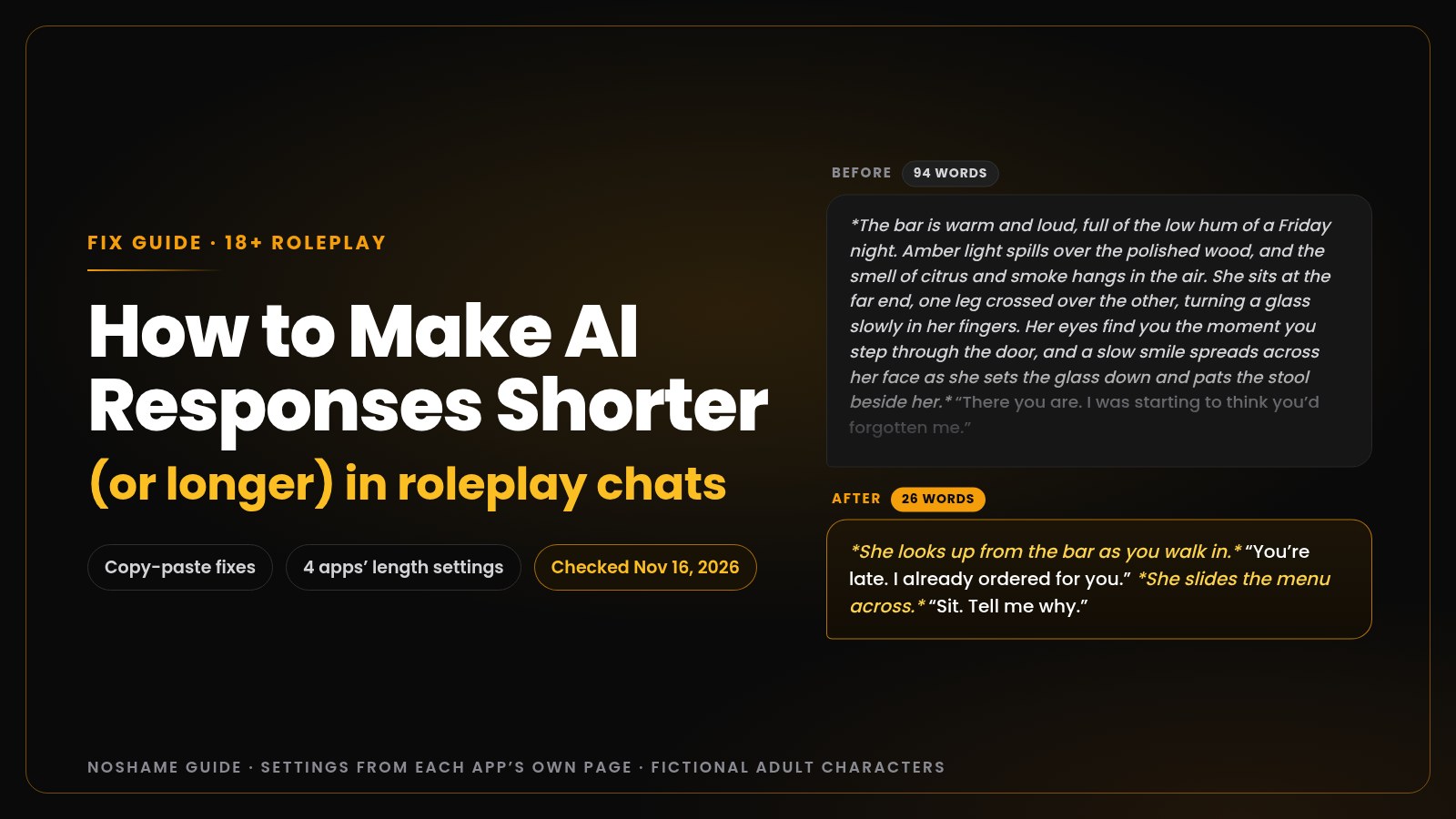
Here is a worked before and after. This is the kind of greeting that causes walls of text:
Before (94 words):
*The bar is warm and loud, full of the low hum of a Friday night. Amber light spills over the polished wood, and the smell of citrus and smoke hangs in the air. She sits at the far end, one leg crossed over the other, turning a glass slowly in her fingers. Her eyes find you the moment you step through the door, and a slow smile spreads across her face as she sets the glass down and pats the stool beside her.* "There you are. I was starting to think you'd forgotten me."
After (26 words):
*She looks up from the bar as you walk in.* "You're late. I already ordered for you." *She slides the menu across.* "Sit. Tell me why."
Same character, same scene, under a third of the length. And the “after” ends on a question, so the next move is yours. Your bot now has a 26-word model to copy. ({{user}} is a placeholder many apps swap for your name. If yours doesn’t, write “the user”.)
On NoShame, creating your own character needs Premium. Fix 1 works on the free messages.
For more on how to set up the scene itself, our guide to setting up an AI roleplay scene that works covers the opener, and what makes an adult AI chatbot good covers reply quality in general.
How to make AI give longer responses
One-line replies have the same cause in reverse. The bot sees short text, so it writes short text. That’s fixable.
- Write a little more yourself. Give the bot something to react to: an action, a line of speech and one detail. Three words in usually means three words out.
- Ask for one more beat, not “more”. “More” gets you padding. A named beat gets you substance.
- Check your settings. A low token cap or a “shorter” setting you forgot about will keep replies small no matter what you type.
Paste this into your chat
(OOC: Write longer replies, 2 short paragraphs. Include what your character feels, one detail about the room, and one line of dialogue. Don't write for me.)
Ask for a set size, like 2 paragraphs. An open “as long as you want” is how you end up back at the wall of text.
Did the fix hold?
Count 3 replies before the line and 3 after. If they creep back, use Fix 3 or 4.
FAQ
Why are AI roleplay responses so long?
Because the bot copies the length it sees. A long greeting, long example lines or a few long replies in a row teach it that long is normal for this chat, and each long reply makes the next one longer. Some app styles are also built to write long. Fix it with a length line in the chat and a shorter greeting.
How do I make AI replies shorter without changing settings?
Add one line at the end of your message, like (OOC: keep your replies to 2–3 sentences, mostly dialogue). Then cut or swipe the next long reply, if your app lets you, so the bot has a short reply to copy. If it drifts back, repeat the line. This works on free plans in every app.
Does lowering max tokens make replies shorter?
Not really. Max tokens is a hard cap, not a target. The bot doesn’t plan to fit it, so a low cap just cuts replies off mid-sentence. Set the cap a little above the length you want, then shorten replies with your prompt, the character card and the greeting.
Why did my AI’s replies suddenly get shorter?
Usually one of three things. Your own messages got shorter and the bot matched you, a length setting or token cap changed, or the app changed its default style. Check your settings first. Then send a longer message with an action and one detail, and ask for a set size, like 2 paragraphs.
How do I stop the AI from writing my character’s actions?
Add this to your message: (OOC: only write for your own character, never my actions, words or thoughts, and stop when it’s my turn). If you can edit the card, put the same rule in its style line. Shorter replies help too, because the bot has less room to fill with your lines.
Is reply length a paid feature?
It depends on the app, as of November 16, 2026. Janitor AI’s Response length is for Janitor and Janitor+ users. Character.AI’s Style Control was announced for c.ai+ members. On NoShame, the reply-length choice is in Premium+. The in-chat fixes in this guide are free everywhere.
Set it once
Tired of repeating the line? On NoShame Premium+ you set reply length once ($23.99/mo, billed $287.88 yearly).
The 15 free messages let you try the chat. The length setting is Premium+.
Premium from $7.99/mo, billed $95.88 yearly. Discreet billing, cancel anytime.
Try NoShame freeYou will need a free account, and every character is a fictional adult.
Read next
Got the length right and the scene still falls flat? Read our AI sex chat tips for setting up a scene. Weighing what a paid plan is worth? Our live AI sex chat price comparison lists what each app charges, with dates.
Sources
All read November 16, 2026, Istanbul time (UTC+3).
- Janitor AI, “we redesigned the api settings page” (posted July 19, 2026: Response length Standard or Shorter, Generation controls)
- Character.AI, Community Update March 2025 (response length customization, under c.ai+ updates)
- Character.AI on X, August 5, 2026 and the r/CharacterAI announcement thread (long-form style and Style Control for c.ai+, with the length labels Long, Looong, Loooooong)
- C.AI Troubleshooting and Limitations (updated June 17, 2026: swiping to regenerate)
- SillyTavern docs, Common Settings (Response tokens is a maximum)
- noshame.ai/premium (Premium+ reply-length choice and prices)
That’s the whole fix: show the bot the length you want, and most of the time it follows.
NoShame is 18+ only. All characters are fictional, AI-generated adults, and you are always talking to an AI.