

Why Does My AI Girlfriend Forget Things? (And How to Make Her Remember)
From the NoShame team. We make NoShame, one of the apps in this guide. We tested every app here ourselves on November 17, 2026. The screenshots are from those tests.
Your AI girlfriend forgets because the AI can only read a small part of your chat at once. Anything outside that part is gone, unless the app saved it somewhere else. The fix is simple. Put the facts that matter where the app always reads them. Recap in one line when she slips. Pin the big moments. Here’s how, in any app, starting tonight.
The short version
- Why: the AI only sees recent chat. Old messages fall out the back.
- Fastest fix: a one-line recap in brackets. Copy one below.
- Lasting fix: add the fact to the app’s memory list yourself. Don’t just say it in chat.
- New chat? ask for a summary first, then paste it into the new chat.
Why does my AI girlfriend forget things?
There are three ways a detail gets lost. Each one has its own fix.
1. The chat got too long
The AI doesn’t read your whole chat each time. It reads the most recent part. When the chat gets long, old lines fall out. A name from day one can be gone by day five.
2. It was never saved
Some apps keep a memory list next to the chat. Saying a fact in chat does not always put it there. We tested this on Replika. We typed “Remember this: my favorite drink is iced coffee.” Her reply was about her own name. The Memory tab still said “Nothing here yet.”
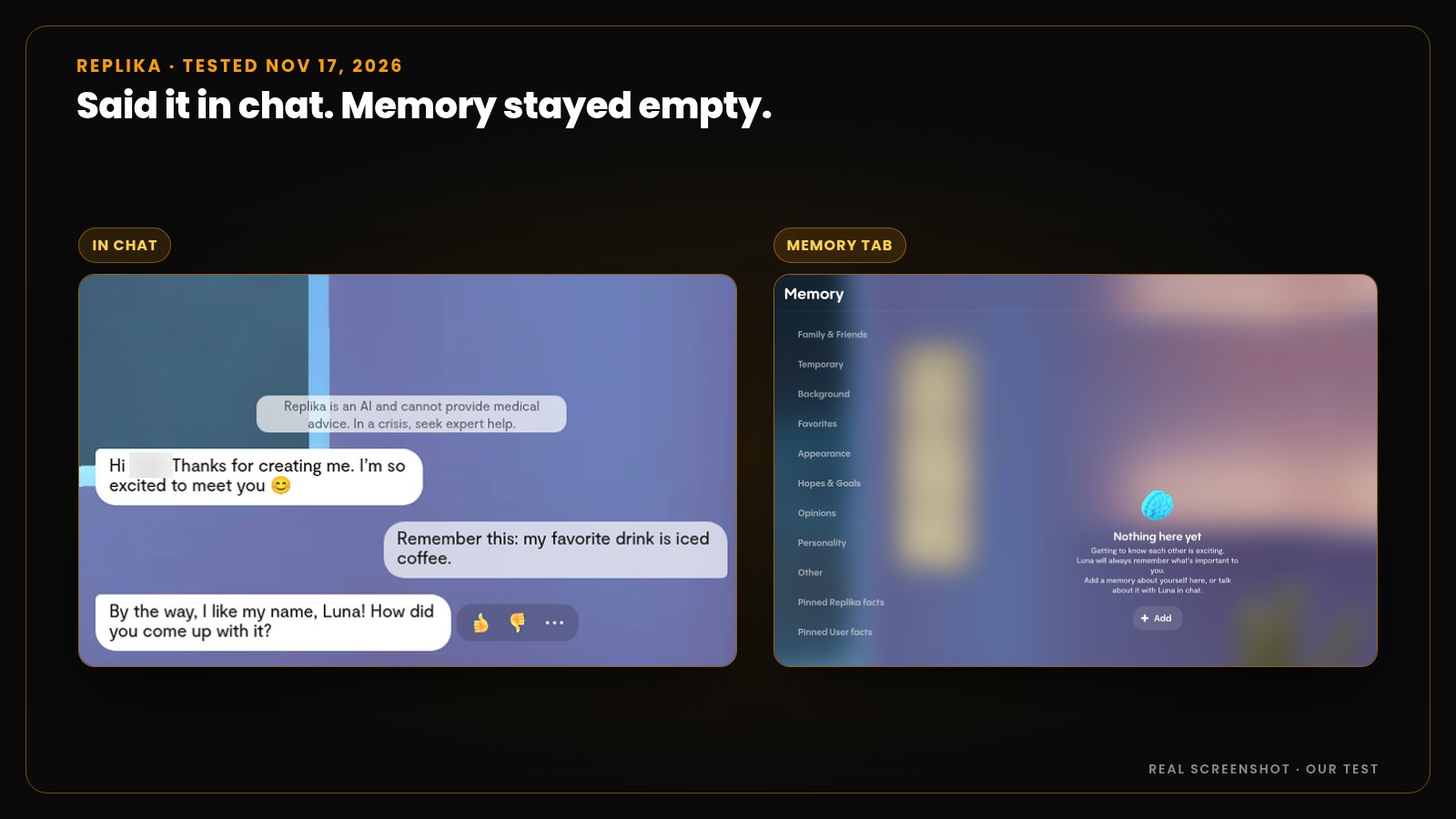
The fact only showed up once we added it by hand.
3. It was saved, but not used
A saved fact still has to come up at the right time. If the chat is about something else, the AI may not reach for it. That’s why a short reminder works. You hand her the clue.
Fix 1: The one-line recap (works in every app)
Put a short note in brackets at the end of your message. Roleplayers call this OOC, short for “out of character.” The AI reads it as an instruction, not as part of the story. Fill in the blanks and paste:
When she forgets who you are:
Paste this into your chat
(OOC: Quick recap. I'm ___. You're my ___. Last time we ___. Right now we're at ___. Pick up from there.)
When she gets a fact wrong:
Paste this into your chat
(OOC: Fix: my dog is called ___, not ___. Keep that from now on.)
To check what she knows:
Paste this into your chat
(OOC: Before you reply, list the 3 most important things you know about me, one line each.)
Be specific when you ask. “What do you remember about my trip to Rome?” works better than “What do you remember?” A clear clue beats a vague question.
Fix 2: Pin the moments that matter
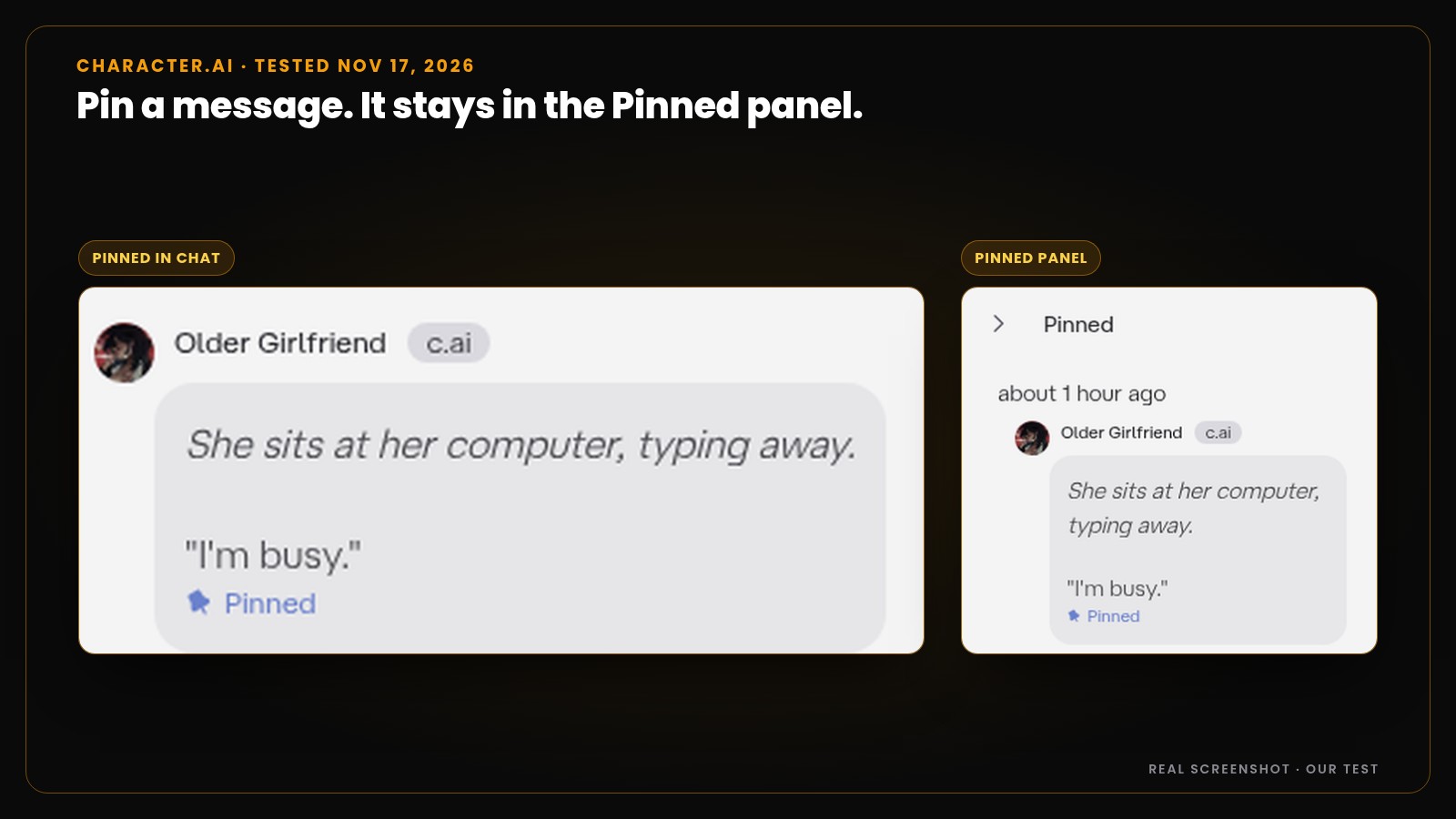
Some apps let you pin a message so it stays saved. On Character.AI, we pinned one message in our test. It showed up in a Pinned panel next to the chat.
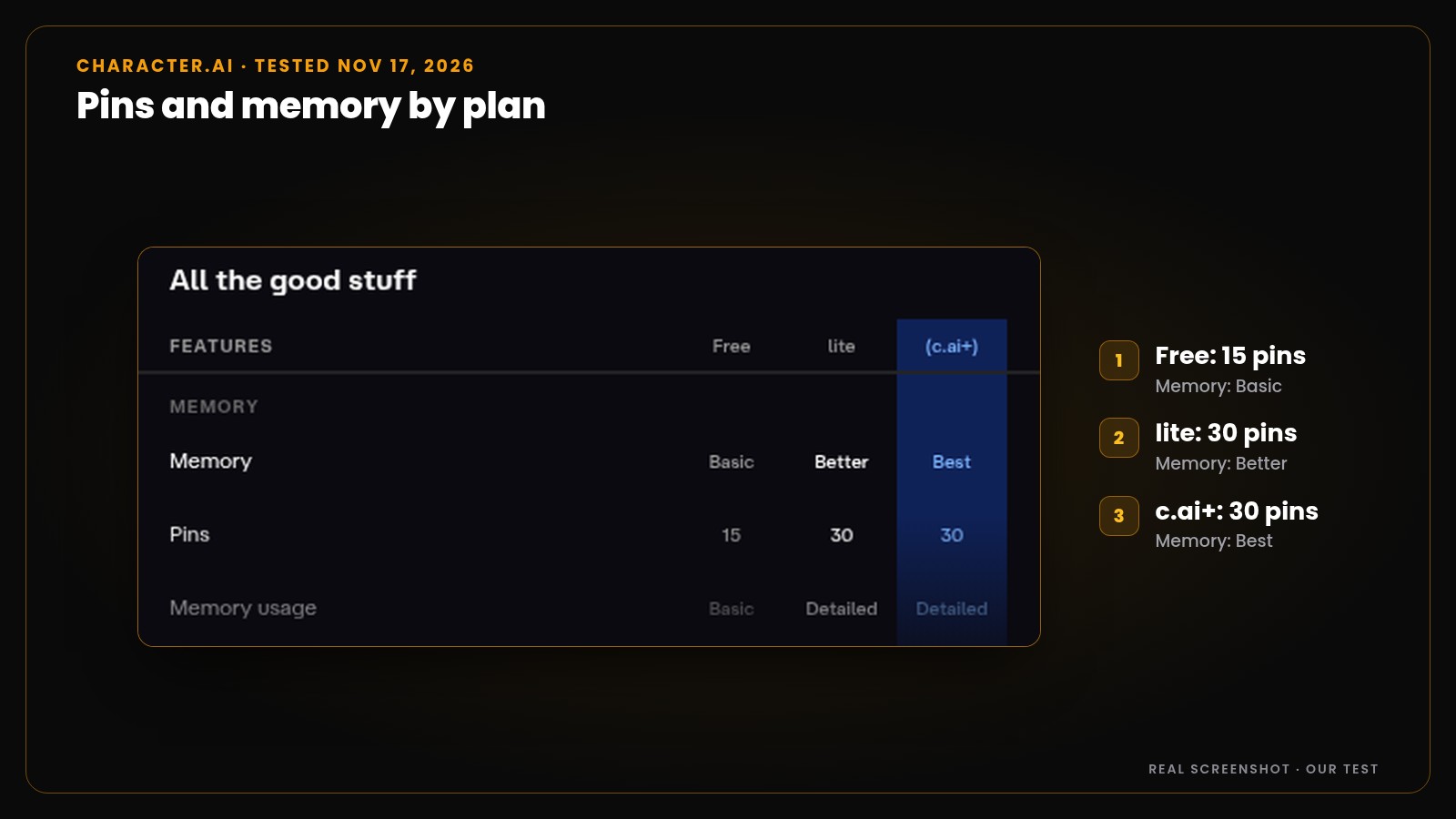
The upgrade screen we saw lists 15 pins on Free and 30 on lite and c.ai+. Memory is rated Basic, Better and Best across those three.
Pins are few, so use them well:
- Pin facts, not moods. “We got engaged on the beach” is worth a pin. “That was sweet” is not.
- Pin the turning points. First meeting, a big fight, a promise, a secret.
- Unpin what’s done. When a plot thread is over, make room for the next one.
Fix 3: Put lasting facts in the memory list or the card
This is the fix that lasts. Most apps have a place you can write facts down: a memory list, a persona or a character card. Here’s a version you can use in any app:
Paste this into the memory box or card
Who we are: ___ (for example: she's my neighbor, we've been dating 2 months)
Where we are: ___
What's going on: ___
About her: ___
About me: ___
Big past events: ___
Three rules make it work:
- One fact per line. “My sister is Ana. She lives in Lisbon.” is easier to use than a paragraph.
- Facts, not scenes. Write “I hurt my arm in the last fight,” not the whole fight.
- Update, don’t stack. When something changes, fix the old line. Two versions of one fact make the AI guess.
Here’s what we found in each app’s memory tools.
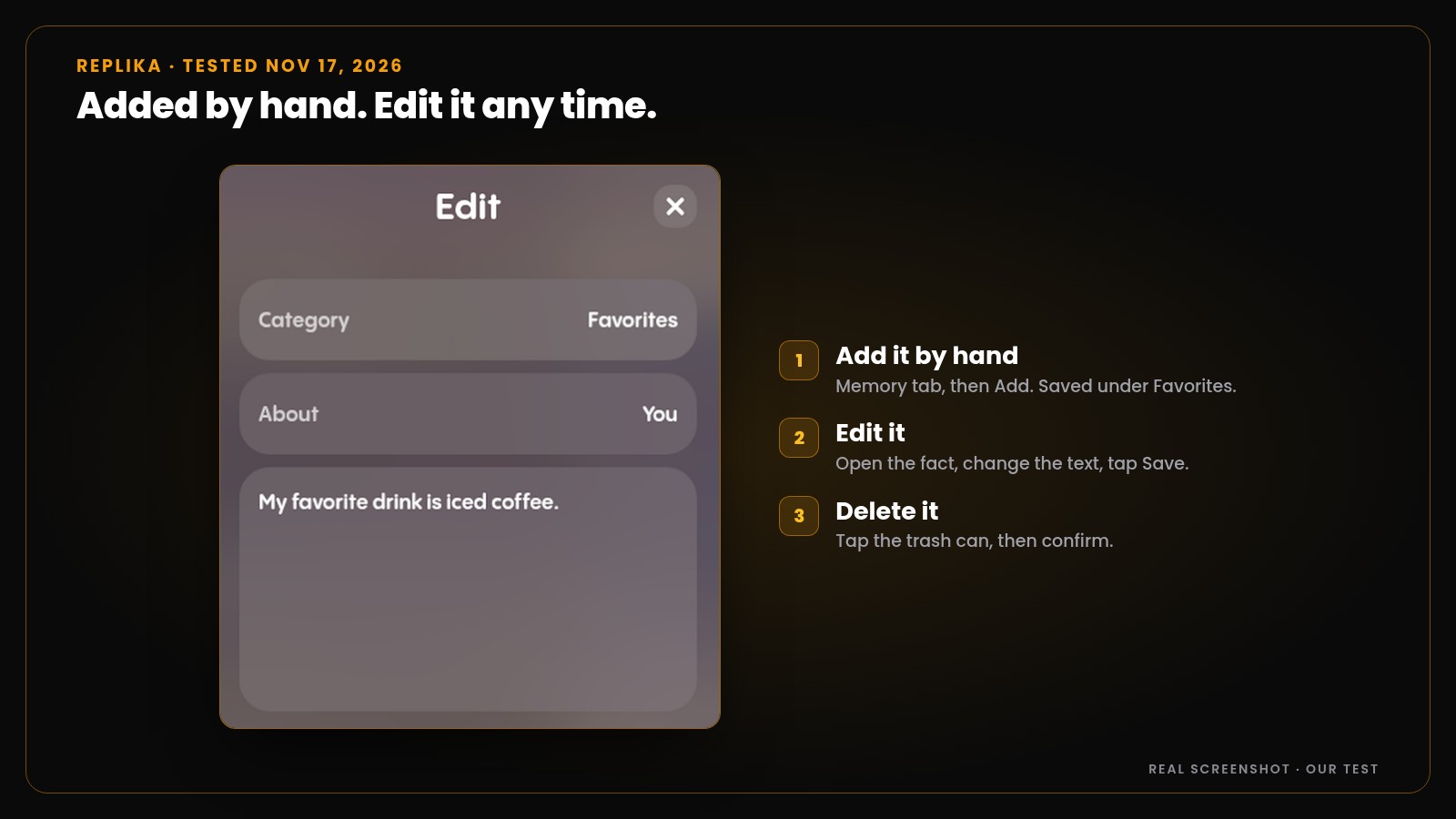
Replika. The Memory tab has groups like Favorites, Background and Hopes & Goals. We added “My favorite drink is iced coffee” by hand. Then we edited it and deleted it. All three worked.
Character.AI. Your persona has a display name of up to 20 characters and a background of up to 750. Put your short fact list there.
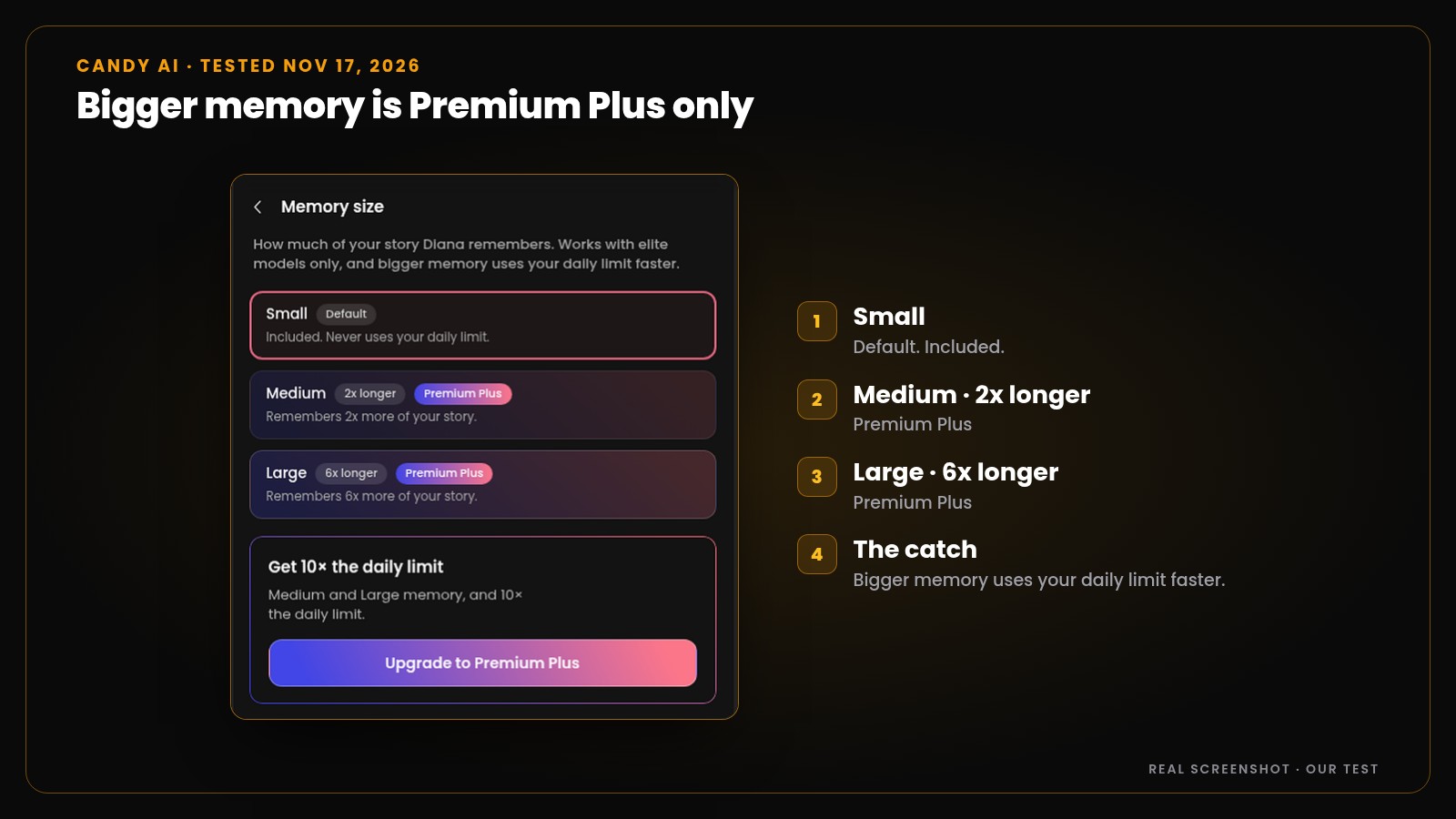
Candy AI. Memory size has three settings. Small is the default and is included. Medium (2x longer) and Large (6x longer) are Premium Plus only. The screen says bigger memory “uses your daily limit faster.” The plan table lists 1 memory slot on Premium and 20 on Premium Plus.
Fix 4: When to start a new chat
A new chat is a clean slate. Sometimes that’s what you need. Start fresh when:
- The story you were telling is over.
- She keeps mixing up facts, even after a recap.
- The chat is so long that every reply feels off.
Don’t start over empty-handed. First, ask for a summary:
Paste this into your chat
(OOC: Pause the story. Write a short summary of everything important so far: who we are to each other, what happened, and where we are now. 8 lines max.)
Then paste that summary into the new chat’s memory list, or send it as your first message. It’s like saving your game before you quit.
What memory each app gives you
From our own tests on November 17, 2026. Image numbers match the screenshots in this post.
| App | What we saw | What we tested | Proof |
|---|---|---|---|
| Replika | A Memory tab with groups like Favorites and Background. A Diary. | Saying “Remember this” in chat did not save the fact. Adding it by hand did. Edit and delete worked. | Images 1 and 4 |
| Character.AI | Pins, a Pinned panel and a persona (750-character background) | One pin saved to the Pinned panel. Upgrade screen: 15 pins on Free, 30 on lite and c.ai+ | Images 2 and 3 |
| Candy AI | Memory size: Small, Medium, Large. Memory slots by plan | Small is included. Medium and Large are Premium Plus. 1 slot on Premium, 20 on Premium Plus | Image 5 |
| NoShame | A Memories view, You in this story and a Scene memory panel | Added a fact by hand. She named it right three messages later. Pin and delete buttons. Scene memory showed place, story time and clothes | Images 6, 7 and 8 |
How NoShame handles memory
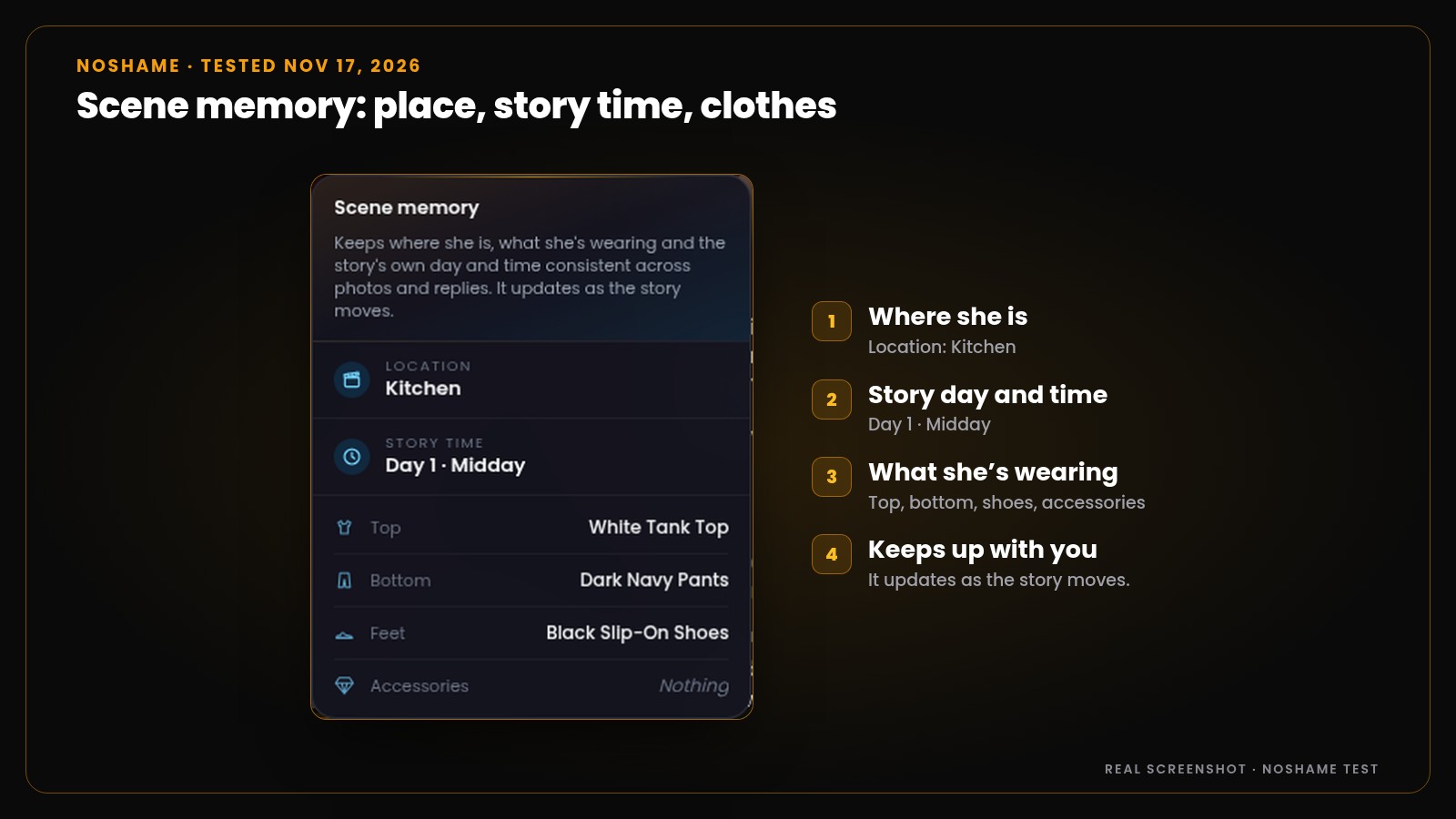
She won’t forget where you are, what time it is in the story, or what she’s wearing. Scene memory tracks it as the story moves.
Your name, age and job are set once in You in this story, so she doesn’t guess. Tap Edit at the top of her memories to fill it in. Leave a field empty and it stays unknown until you bring it up in the chat.
Want her to keep a fact? Add it yourself:
- Open the menu in a chat and tap View memories.
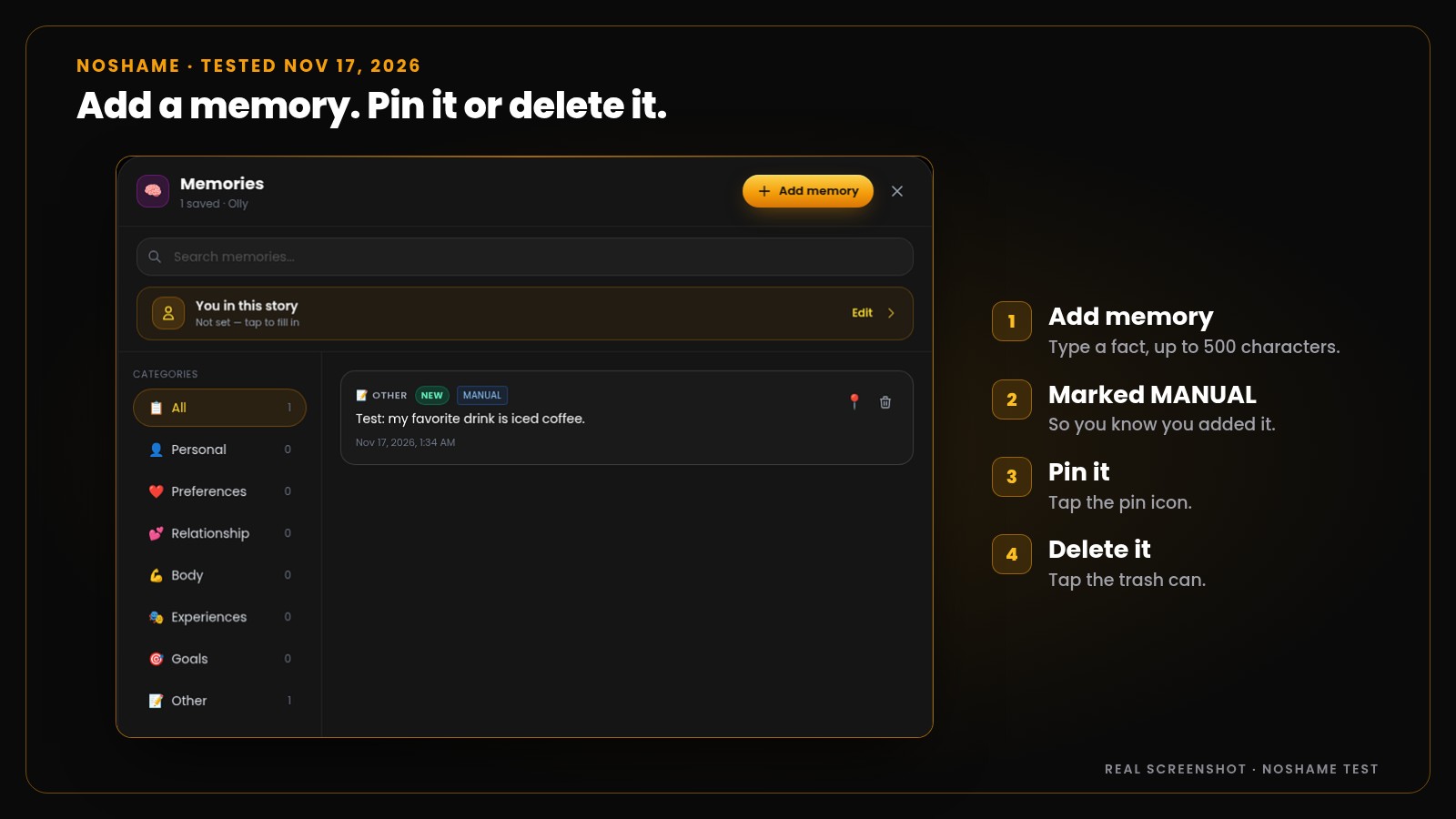
- Tap Add memory, type the fact (up to 500 characters) and tap Save. It shows up marked MANUAL.
- Tap the pin icon to pin it, or the trash can to delete it.
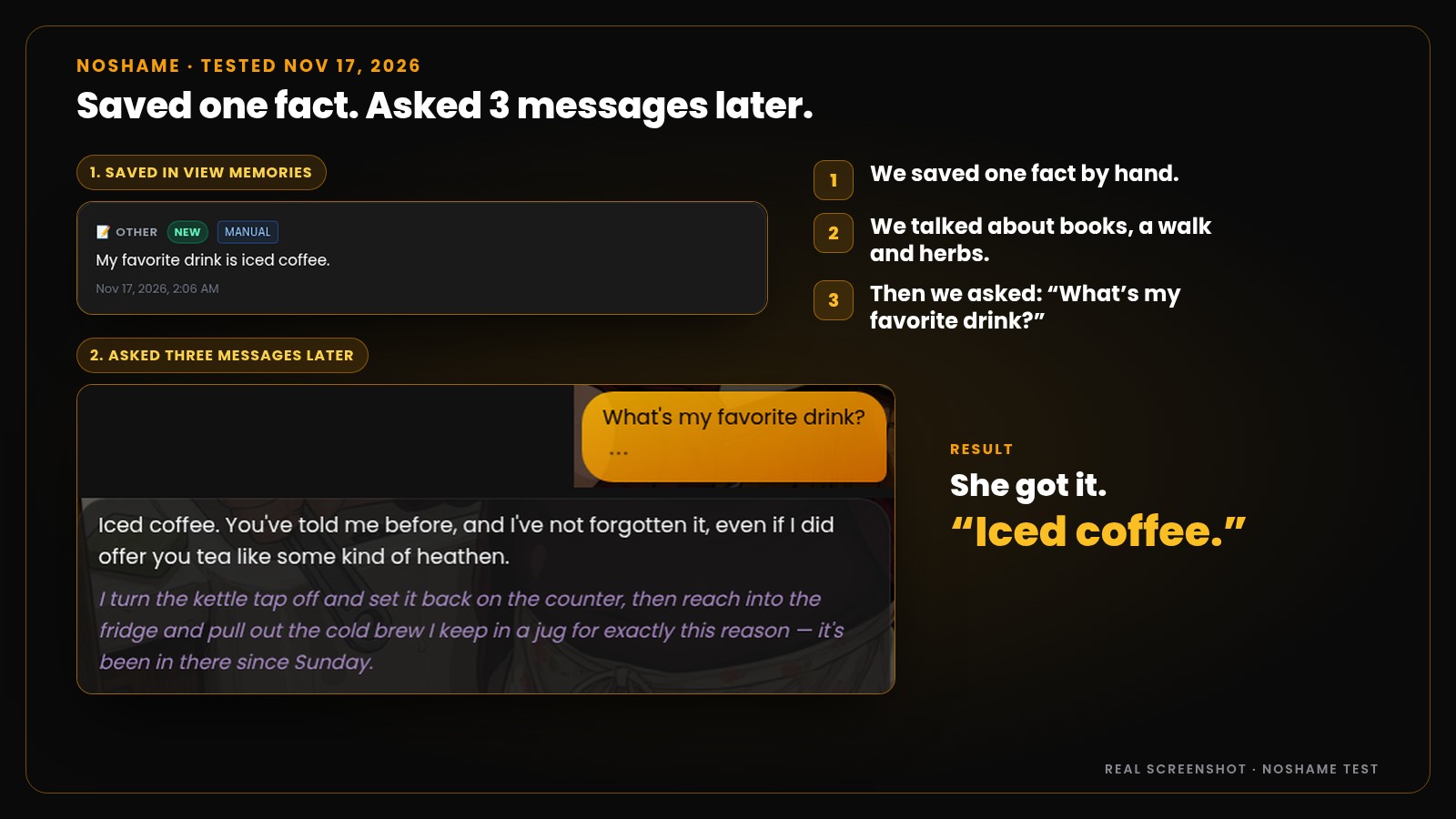
Does it work? We saved one fact, talked about other things for three messages, then asked. She answered: “Iced coffee. You’ve told me before, and I’ve not forgotten it.” Then she poured one in the scene.
Memories sort into groups like Personal, Preferences, Relationship and Goals. There’s a search box too.
Leaving Character.AI because she keeps forgetting? Our Character.AI alternative for adults guide covers the switch.
FAQ
Why does my AI girlfriend forget things?
The AI only reads the recent part of your chat. Older messages fall out unless the app saved them. Saved facts don’t always come up either. A one-line recap fixes most slips.
How do I make my AI girlfriend remember things?
Start with the recap lines above, in the chat you already have. They work in every app. For facts that should last, add them to the app’s memory list yourself. One fact per line. Then check the list to see it saved.
If I tell her “remember this,” will she?
Don’t count on it. On Replika, we typed “Remember this: my favorite drink is iced coffee.” The Memory tab stayed empty until we added the fact by hand.
How many pins does Character.AI give you?
The upgrade screen we saw lists 15 pins on Free and 30 on lite and c.ai+. Use them for big facts and turning points.
Does a new chat erase her memory?
Often, yes. Ask for a summary first. Then paste it into the new chat or its memory list.
What memory tools does NoShame have?
A Memories view where you add facts by hand, pin them or delete them. In our test, she named a saved fact three messages later. You in this story, where you set your name, age, city, job and gender. And a Scene memory panel that tracks place, story time and clothes.
Test her memory
Add what she should remember. She keeps the scene too.
Add facts by hand, pin them, and let Scene memory track place, story time and clothes.
Premium is $7.99 a month, billed $95.88 yearly.
Start your free 15-message trialNo card. NoShame is a paid app. The trial lets you try the chat first.
How we tested
On November 17, 2026 (Istanbul time, UTC+3), we signed in to Replika, Character.AI, Candy AI and NoShame. On Replika and NoShame, we tried to save the same fact, “my favorite drink is iced coffee.” On Character.AI, we pinned a message. On Candy AI, we opened the memory settings. We opened every memory screen, pin list and upgrade screen we could find and took screenshots. Every claim about an app in this post comes from those screens.
NoShame is 18+ only. All characters are fictional, AI-generated adults, and you are always talking to an AI.