
AI Chatbot Repeating Itself? 7 Fixes That Actually Work
AI chat repeating the same lines is usually a pattern you can break. We tried each fix below on Character.AI, NoShame or both on November 18, 2026. None of them needs sampler sliders or a settings file. If you use a hosted chat app, you can do every one of them in under a minute.
If you run your own model (SillyTavern, KoboldCpp), repetition penalty and temperature matter there. This guide is for hosted chat apps, where you can’t touch those.
Why does my AI chatbot keep repeating itself?
Quick answer
An AI chatbot repeats itself when it has nothing new to react to. One-word replies like “ok”, long chats and its own recent lines all pull it back to the same words. The fastest fix is to send a line with something new in it. If the reply still loops, regenerate it or edit your last message.
There are four common causes. Most start with what the bot was given to work with.
1. You gave it nothing to react to
The bot leans hard on your last message. Send “ok” and there is nothing to build on, so it falls back on the mood it already had.
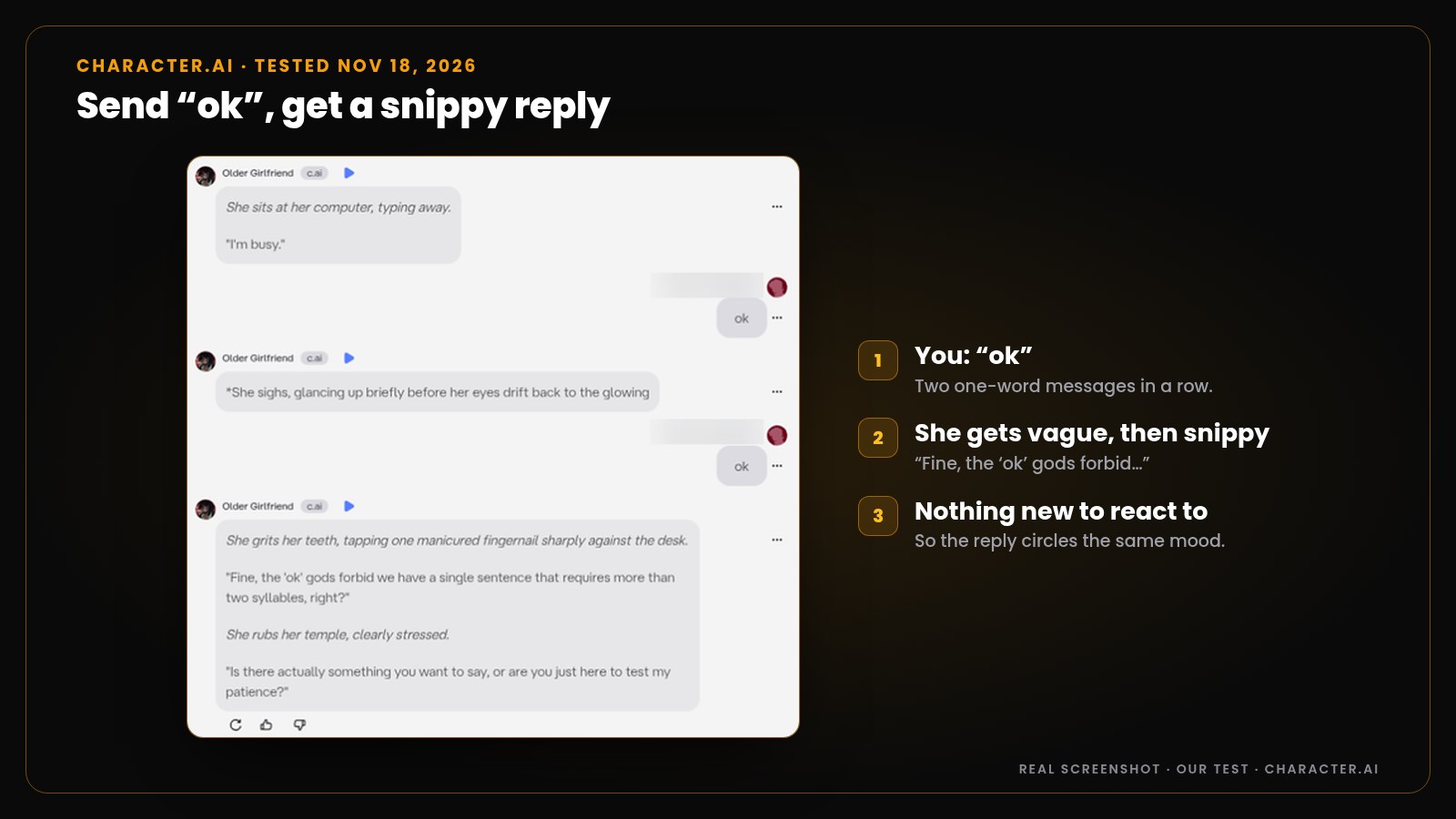
We tried this on Character.AI. We sent “ok” twice to a sarcastic character. The first reply went vague: “She sighs, glancing up briefly before her eyes drift back to the glowing” screen. The second got snippy: “Fine, the ‘ok’ gods forbid we have a single sentence that requires more than two syllables, right?”
NoShame’s own chat guide says the same thing in seven words: “Short, vague lines get short, vague replies.” We sent the same kind of lines (“ok”, “ok”, “haha ok”) to a NoShame character. She didn’t repeat herself. Each reply moved the scene on, down the corridor, into the lift and across the hotel lobby. Still, every bot does better with more to work with. That’s Fix 1.
2. The chat got long
In a long chat, the bot leans hardest on the last few messages. Early details fade, and recent habits take over. So a chat that was fresh at message 10 can feel stale at message 200.
3. The character card and greeting set a pattern
The greeting is the first example the bot copies. Our Character.AI character opened with “She sits at her computer, typing away.” Her next replies? Eyes drifting “back to the glowing” screen, then “She stares at the screen.” Three replies, one desk, one screen.
4. It copies its own recent phrasing
Every reply becomes an example for the next one. If she “smirks” once and you let it stand, the next reply is more likely to smirk too. Five replies later, it’s a habit.
In other words, a loop is a pattern the bot keeps seeing. Break the pattern and the loop breaks.
Quick fix table: what to do when your AI chat repeats
| What you see | Try this first | Then |
|---|---|---|
| Short, flat or snippy replies after you sent “ok” | Fix 1: send a line with an action and a hook | Fix 2: regenerate |
| One reply that repeats the last one | Fix 2: regenerate or swipe | Fix 3: edit your message |
| The same phrase in every reply | Fix 3: edit (on Character.AI, cut the phrase from her reply) | Fix 5: an OOC line |
| Long replies padded with the same lines | Fix 6: change reply style or length | Fix 1: give her a new event |
| She keeps asking things you already told her | Fix 7: save or pin the fact | Fix 1: remind her in the story |
| The whole chat is stuck in one mood | Rewind or branch from an earlier message | Start a new chat |
How to stop an AI chatbot from repeating itself: 7 fixes
Go in order. Fix 1 is the quickest, and the later fixes are for stubborn loops.
Fix 1: Give it something to react to
A good line has three parts: an action, a new detail, and a hook she has to answer. “ok” has none. “*I slide a coffee across your desk.* Ten minutes. Then I’m stealing you for lunch.” has all three.
Copy-paste lines that break a loop
*I slide a coffee across your desk.* Ten minutes. Then I’m stealing you for lunch.*The power cuts out. The room goes dark.* Well. Now what?*Someone knocks at the door.* Were you expecting anyone?*Three days later.* *I find you at the bar where we first met.**I grab your hand and pull you out into the rain.* Surprise me with something you’ve never said before.
The last line is the one we used in our NoShame test. Her reply opened with the rain and went somewhere new: “Something I’ve never said before.” For more scene starters, see how to set up a scene that actually works.
Fix 2: Regenerate or swipe the reply
One bad reply doesn’t mean a bad chat. Ask for a new one.
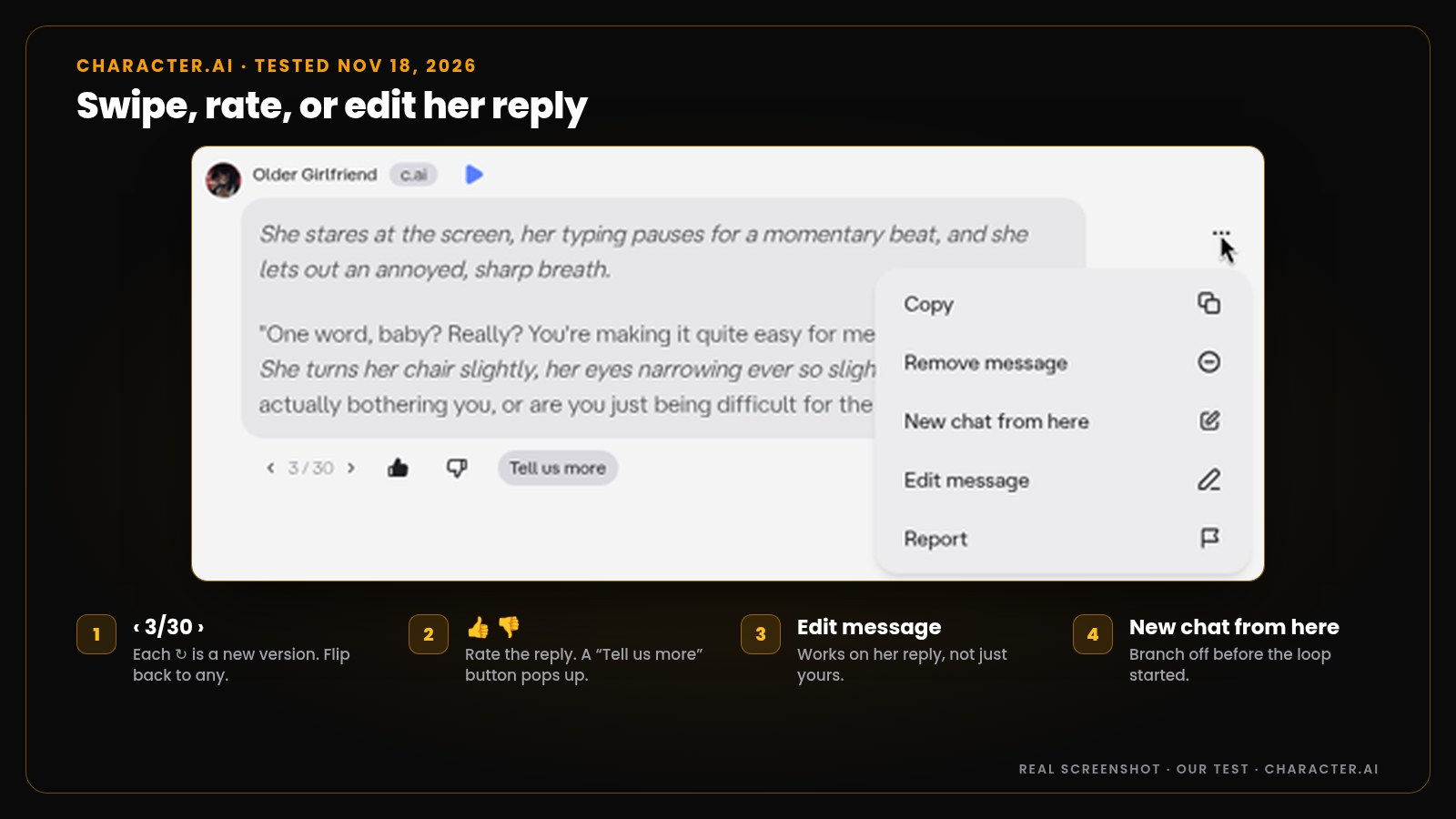
On Character.AI, tap the ↻ arrow under her reply, or swipe. You get a new version and a counter. Ours showed “2/30” after the first tap, and the arrows took us to “3/30”, a different reply each time. You can flip back to any version you liked.
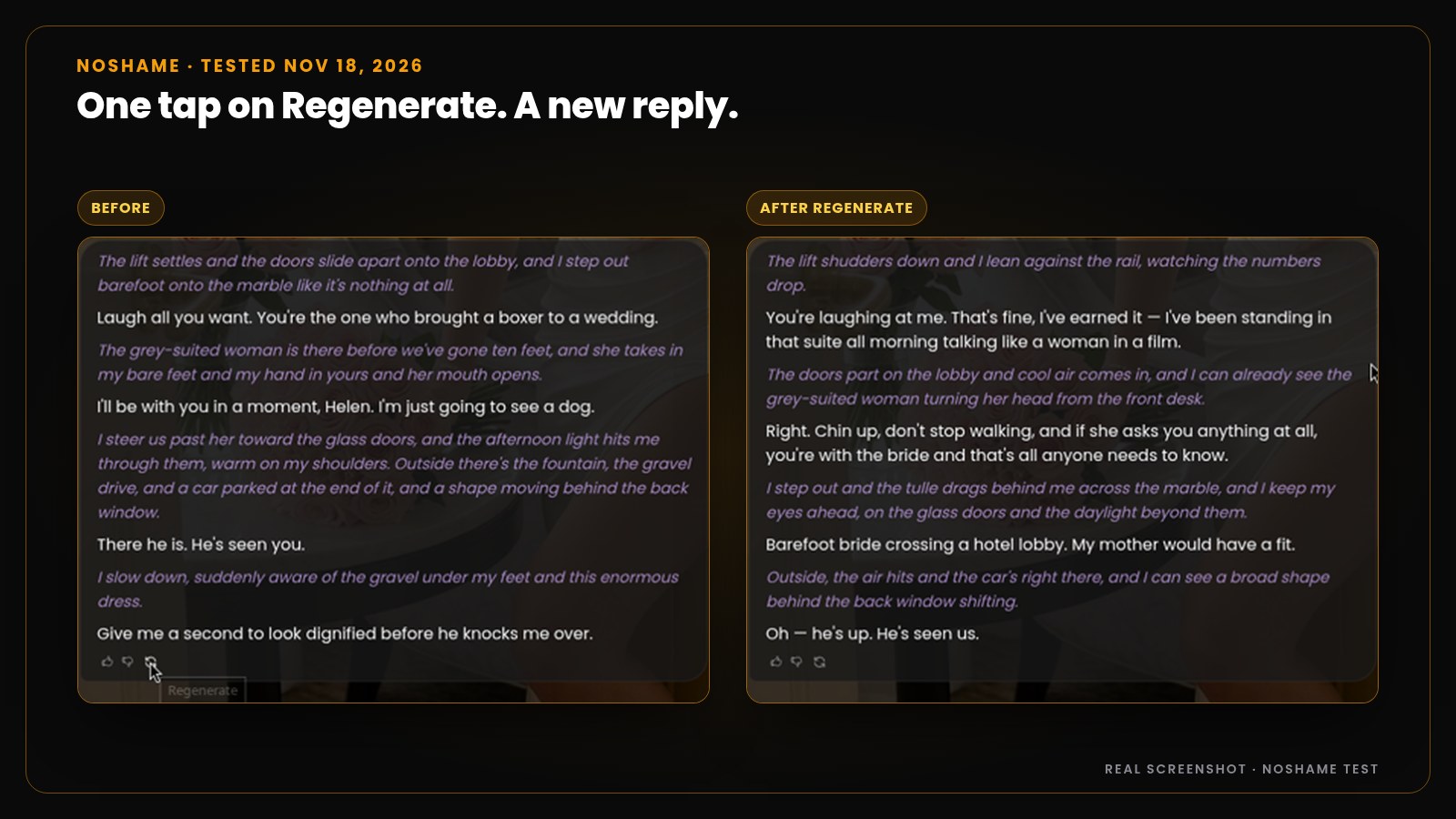
On NoShame, tap the ↻ Regenerate icon under her latest reply and confirm in the short pop-up. The new reply replaces the old one, so copy any line you love before you tap. We did it twice, and both times got a fresh reply. Regenerating never costs gems.
Pro tip: if two or three regenerates all loop the same way, the problem is your last message. Go to Fix 3.
Fix 3: Edit your last message
Your message is the input. Change the input and you change the reply. Both apps let you do this.
On NoShame, tap the … under your own message and pick Edit. Rewrite it with an action and a hook, and she writes a new reply to the new line.
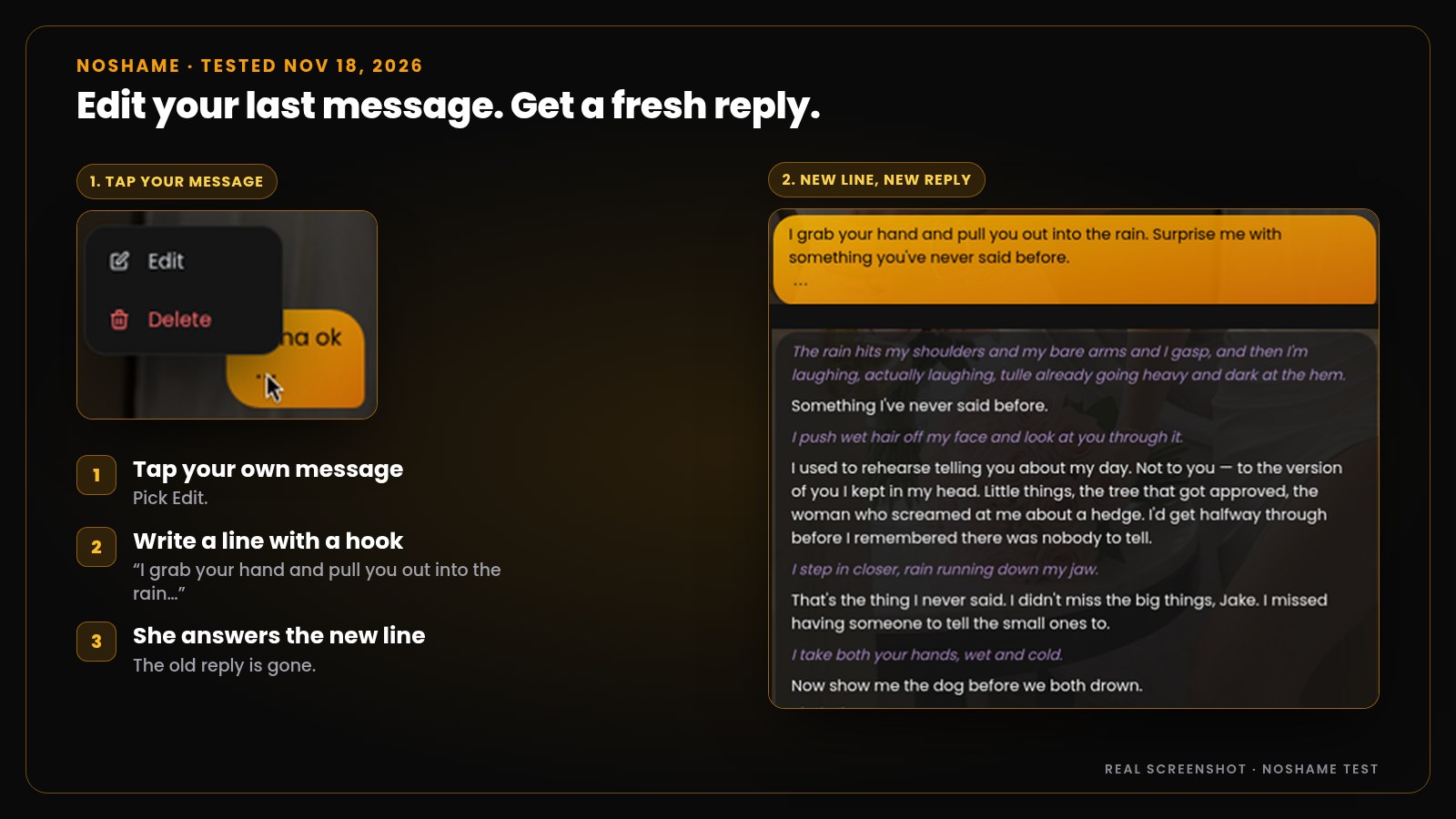
On Character.AI, the three-dot menu has Edit message on your messages and on hers. Editing her reply is handy for one job: deleting the phrase she keeps repeating, so she stops copying it. On NoShame you steer from your side: edit your line, or regenerate her reply.
Fix 4: Rate replies with 👍 or 👎
Both apps let you like or dislike a reply. On Character.AI, a “Tell us more” button popped up after we tapped. On NoShame, you can add a short comment after you tap (NoShame chat guide).
A rating won’t change the reply in front of you. Think of it as a vote. Pair it with a regenerate.
Fix 5: Send an out-of-character (OOC) line
OOC means talking to the writer, not the character. Put it in brackets so it stays out of the story.
Copy-paste OOC lines
(OOC: please stop repeating phrases, vary your wording and move the scene forward)(OOC: no more “smirks” for the rest of this chat)(OOC: skip ahead to the next morning)
Be honest with yourself about what this does. It’s a nudge, not a switch. We sent the first line in our NoShame test, and her replies were already varied, so it had little to fix. The next reply moved on to the car and the dog. NoShame’s roleplay guide puts it the same way: OOC “often works, but it is not a guaranteed, built-in control.”
Fix 6: Change the reply style or length
Long replies give the bot more room to pad with the same lines. Shorter replies give you more turns to steer. Pick the length that fits the scene.
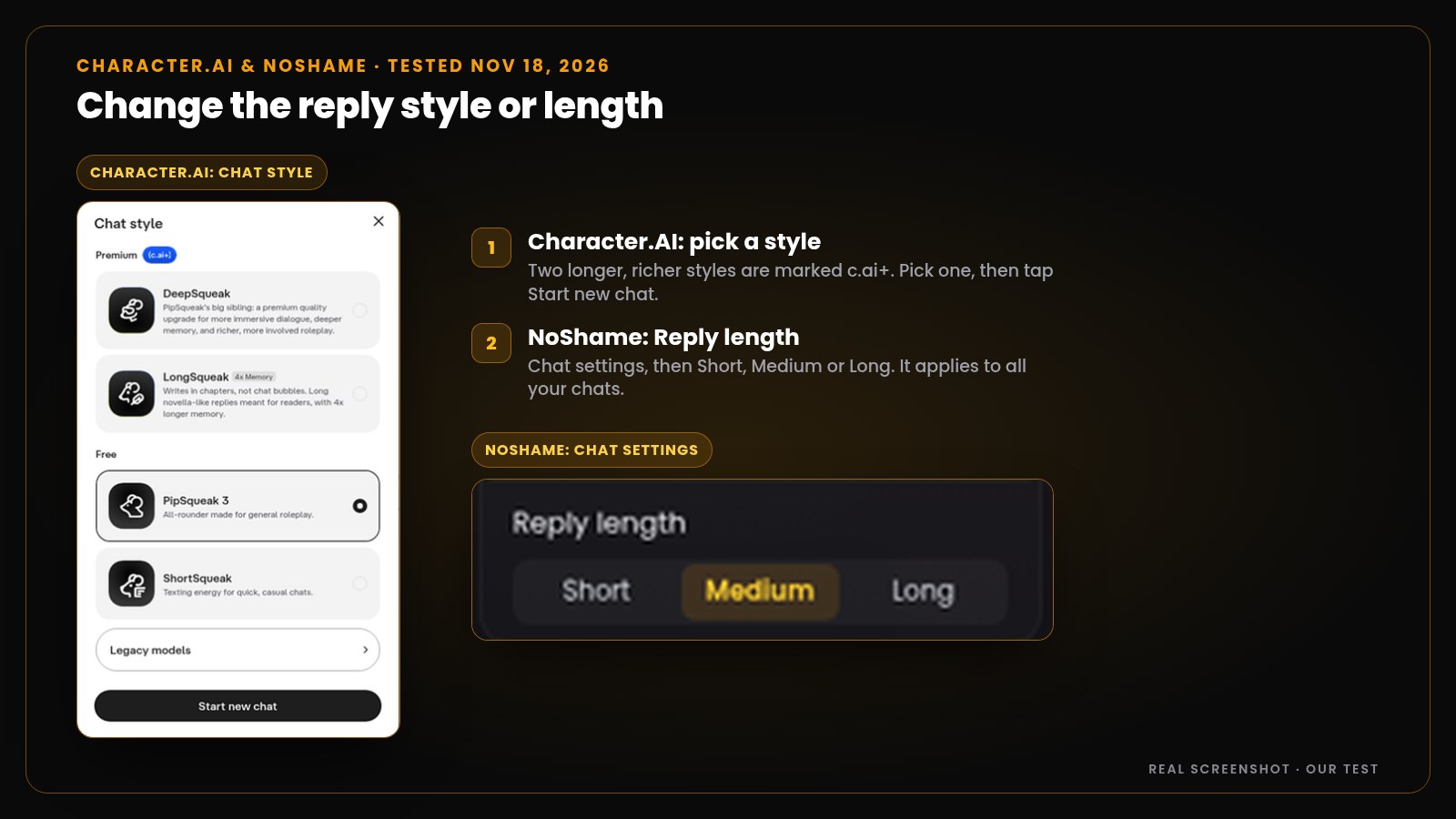
On Character.AI, open Style in the side panel. In our test the picker showed two longer, richer styles marked c.ai+, an all-rounder that our chat used by default, and a short texting style. Pick one, then tap Start new chat.
On NoShame, the quickest way works in any chat: add one line to your message, like (OOC: shorter replies, two paragraphs at most). There is also a Reply length setting in Chat settings, with Short, Medium and Long. Full walk-through: how to make AI responses shorter or longer.
Fix 7: Pin key facts, then rewind
A bot that forgets often circles back. It asks your name again, or drags the story back to the greeting. Saving the facts that matter stops that.
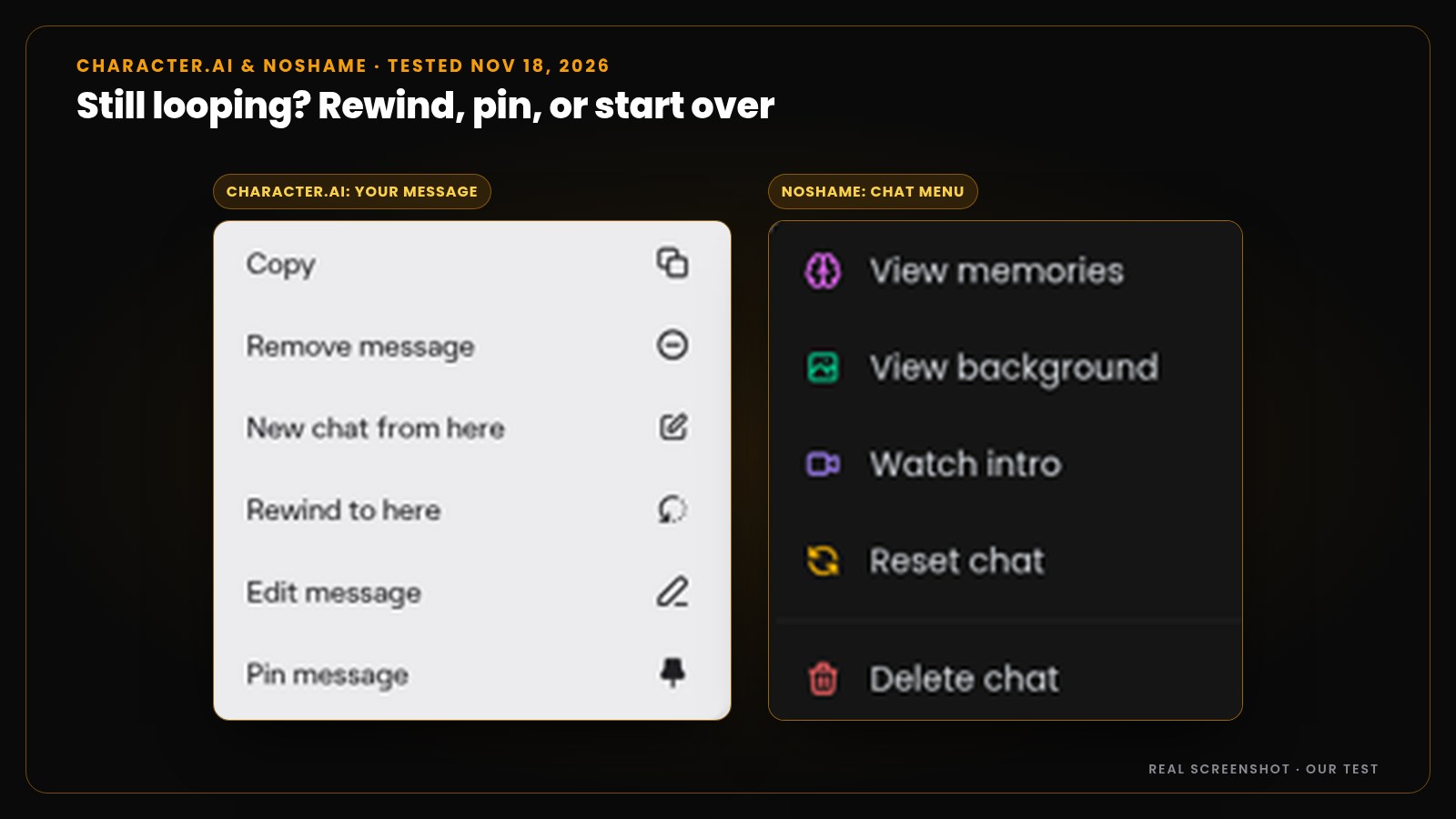
On Character.AI, open Pinned in the side panel. It says: press the three dots next to a message to pin it, and the character “will always remember that message in this chat.” On NoShame, open the chat menu and tap View memories. You can add a memory by hand, pin it or delete it.
More on this in why your AI girlfriend forgets things and how to make her remember.
Still looping? Go back to before it started.
- Character.AI: on one of your messages, tap the three dots and pick Rewind to here, or New chat from here to branch off and keep the old chat.
- NoShame: delete every message from the point you want to redo, including that one, then send a different line (roleplay guide). Deleted messages can’t be brought back. To start over with the same character, open the chat menu and tap Reset chat.
That’s the last resort. Try the other six first.
Character AI bot repeating itself? Do this
Character.AI gives you several tools for this. Use them in this order: send a better line, swipe through a few versions, edit her reply to cut the repeated phrase, pin the facts she keeps losing, then rewind to before the loop.
Searching “janitor ai repeating” instead? Fixes 1, 3 and 5 are about what you type, so they work in any chat app.
Meet Emma
Your ex, four years on. Her wedding is today, in this hotel, and you came.
In our test she kept the scene moving with every reply. Unlimited regenerates on Premium, never a gem, and you can pin the facts that matter in View memories.
Chat with EmmaTry it with a free 15-message trial, no card.
FAQ
Why does my AI chatbot keep repeating itself?
Usually because it has nothing new to react to. Short replies like “ok”, long chats, a greeting full of the same phrases, and the bot copying its own recent lines all cause loops. Send a line with an action and a hook, then regenerate if it still repeats.
Why does my AI girlfriend keep saying the same thing?
Usually because she has nothing new to react to, or one reply got copied into the next. Send a line with an action and a hook (Fix 1). If the next reply still loops, regenerate it (Fix 2).
How do I stop Character AI from repeating itself?
Send a line with something new in it, then swipe for a new version. You can also edit her reply to remove the repeated phrase, pin key facts, change the chat style, or use Rewind to here on an earlier message. We checked these options on Character.AI on November 18, 2026.
Does regenerating a reply cost gems on NoShame?
No. Regenerating never costs gems. On the 15-message trial each regenerate uses one trial message. On Premium, regenerates are unlimited. The new reply replaces the old one.
Does an OOC note stop an AI from repeating?
Sometimes. A line like (OOC: please stop repeating phrases, vary your wording and move the scene forward) is a nudge, not a switch. If the bot ignores it, edit your last message or regenerate.
Should I start a new chat if the AI keeps repeating?
Only as a last resort. Try a better line, a regenerate and an edit first. If the whole chat is stuck, rewind or branch from an earlier message. On NoShame, Reset chat starts the conversation over with the same character.
Sources
Checked November 18, 2026: our own hands-on tests on Character.AI and NoShame (screenshots above), and the NoShame docs pages Chatting, Roleplay guide and Memories.